Sunday, November 7

Scratch Tutorials....

These are eight of the features that i chose to do to experiment with the Scractch software.
1.) Glidng: Ghost
I made a ghost glide around space and say 'hooo' by using the "say" control. I have used the gliding technique to  allow the character to smoothly follow a given direction. we can give them the directions points either through typing in the specific points x and y
2) Follow the Mouse: A monster creature following the mouse
This is the simple script for making a character move to a mouse pointer.
We have to put the "when flag clicked" button so that we know when the character will begin to chase after the mouse pointer we need to put the forever control option otherwise it will have a time limit which doesn't make any sense of course we need to put the point towards a mouse pointer so that the character faces that way. if we simply do this and not put the "move 3 steps" bit then the character will not move but will simply turn to the mouse pointerThe purpose of "move 3 steps" is to make the character chase after the mouse rather than just staying still. I have repeated this action10x.
3) Say Something
I have made the sprites in this scratch to say something simply by just using the say operation.
4+5) keeping score and key moves

6.)Interactive Whirl
7. Moving Animations
In this instance i have managed to make a bat to move and when it reaches a wall it just bounces of the wall and appear to be flapping its wings by using the change costume control. The move __spaces control allows the bat to move steps back and forth as well.

Friday, November 5

Using scratch in class

We are making an ant which moves around and it eats a fortune cookie and tells the other ants to come in and join in with it to eat it. The purpos eis to make a sprite you can move up down with the arrows
  1. We have imported the costumes of the ant and the fortune cookie fromt he scratch files.
  2. and then made the steps for it to do when moving the arrows
  3. When the ant eats the cookie it makes the sound of a "shaker" whenever ant gets to fortune cookie it makes this sound


Here's are scrren shot of what we have done so far.

Broadcast useful in a game: when 1 sprite tells the other sprites what to do. e.g when pacman eats the last food it means its the next level.like background needs to change and pacman has to change also food of pacman has to change.When lots of things have to be told all at once you have to use a broadcast. Partner code: when you receive.

Tuesday, October 26

Scratch controls

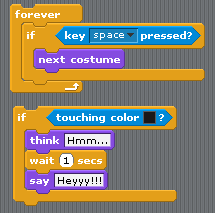
These are some controls on scratch
The forever key: is so that the steps in the algorithym are repeatead continously.
The "if" key which here is located in the forever control: Is to show that this will hapen if the key (space) is placed and therefore if the key is pressed the sprite's costume will change into the enxt costumes.
 The next "if" key is to show if the colour black is clicked the spritesd will have a thinking bubble saying "hmmm" and one second after tthat it will say "hey".

Friday, October 22

Sample Flowchart..


This is the flowchart which i made !

Thursday, October 21

Sample Flowcharts...

Work...

This first flowchart is showing us the the process of how to determine if the temperature is or isfreezing or below freezing temperature.
This flowchart is an algorythm for how long the LED light is turned on. After one second its turns off

Wednesday, October 20

Sample Flowcharts...

Flowchart info
This diagram is typical of most flow charts you will find in process documentation. Using these basic symbols is a simple but effective way to provide a graphical snapshot of a process. The following is an overview of the symbols:

The rectangles indicate Process steps.
• The diamonds indicate Decisions, or branches in the process.
• The circles indicate Connectors which act as jump nodes from one part of the process to another.
• The ovals ( Terminators) indicate the process boundaries, showing where the process starts and stops.
• The arrows ( Flow Lines) indicate the process flow direction.


Tuesday, October 12

"Computers never do what you want them to do, They only do what you tell them to do!"

1. Algorithms: Step by step set of instructions or plan for a procedure to do something.They describe it exactly how to do something

2. Pseudocode: A short,list of consecutive phrases written in English.They are  used to explain specific tasks within a program's algorithm.
3. Machine Language: Also known as computer language, is a system of instructions and data executed directly by a computer's central processing unit it requires no translation before being run

4. High Level Computer Language: A computer language whose instructions or statements each correspond to several machine language instructions, designed to make coding easier.

5. Flowchart: is a type of diagram, that represents an algorithm or process it shows the steps in boxes of  kinds, and their order by connecting these with arrows. They are used to give instructions on how to complete a certain task.

6. Sequence: In the order of which something happens in a logical order.

7. Selection: The act of the process of selecting

8. Repetition: The act of doing or performing something again.